Repository navigation
Add Delete functionality for Peek - #35418
Conversation


| { | ||
| wFunc = FO_DELETE, | ||
| pFrom = path + "\0\0", | ||
| fFlags = (ushort)(FOF_NOCONFIRMATION | (permanent ? 0 : FOF_ALLOWUNDO)), |

There was a problem hiding this comment.
Does this override the recycle bin property? (It is possible to configure the delete confirmation in the recycle bin properties.)
How does Fotos app handle it?
There was a problem hiding this comment.
This replicates how the Photos application handles deletes. Pressing Delete immediately sends the file to the Recycle Bin without popping up a message, and then it moves on to the next file.
The permanent argument is there for possible future use, but is always false for now.

|
Dave Rayment (@daverayment) |

This comment has been minimized.
This comment has been minimized.
|
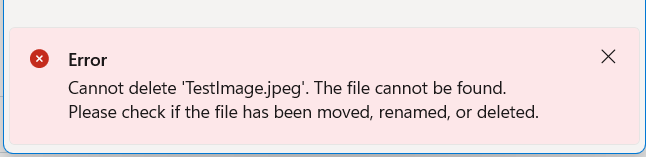
Thanks for your comments and suggestions. I've updated the code with an error InfoBar, which is shown when a delete fails:
I've added user-friendly messages for the most common failures. Others result in a generic message being shown on the InfoBar. The failure is also logged, with the code and a more technical error message (taken from If the file still exists after the deletion attempt, it is kept in the items collection for previewing; otherwise it is removed. An aside: Windows Photo handles files being renamed or deleted differently to Peek, in that it seems to constantly monitor the folder. (Try changing the filename of a photo you're previewing and you can see it update in the UI after a second or two.) We may wish to replicate this functionality in the future, as it would be increase robustness, but that it outside of the scope of this issue. |
 Clint Rutkas (crutkas)
added
the
Needs-Review

 Jaime Bernardo (jaimecbernardo)
left a comment
Jaime Bernardo (jaimecbernardo)
left a comment
There was a problem hiding this comment.
Thank you for opening the pull request.
Generally looks good to me, but there's the issue that this might be unintentionally pressed by the user, getting a file deleted he might not have intended. Even though it ends up in the Recycling Bin, I think having a Message Box Prompt first would be safer. I'm OK with a setting to disable this warning, but it should show a confirmation prompt by default.
Hope this makes sense.

Agree. Could also try to get/use the setting for the Recycle Bin itself. |
Doesn't the code does this yet? Or better asked: Isn't this handled by Recycle Bin itself? |
Nope, the code uses |
|
Jaime Bernardo (@jaimecbernardo) Heiko (@htcfreek) Jay (@Jay-o-Way) Thank you for the review and guidance. However, I disagree with displaying a prompt. The default Windows functionality for file deletions is not to show a confirmation prompt. The whole purpose of the Recycle Bin is to to protect against accidental deletions. The behaviour in Peek was deliberately chosen to be consistent with both Windows Explorer and other file viewer tools such as the Windows Photo App and third party apps like IrfanView. I believe users would find a confirmation dialog unnecessary or redundant every time they want to delete a file, which could be a common action when sorting through a large folder of files. Also, PowerToys is supposed to be for power users, so I don't think we should go out of our way to provide guardrails for easily-reversible common mistakes such as accidentally pressing the delete key (which is also not near the default Peek navigation keys). To summarise, I don't think we should provide non-default behaviour which would slow down a user's workflow. |

|
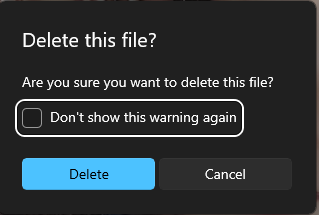
I've tried the Windows "Photos" app, it does show a confirmation prompt: |
|
I imagine you might've already clicked that "Don't show this warning again" Dave Rayment (@daverayment) . |
|
I've also just tried the feature on an external drive. As expected, files were permanently deleted without going to the recycle bin. I don't feel easy causing potential data loss with a feature that wasn't there before without some initial guardrails so the user understands that feature is there 😅 Hope this makes sense to you. |
|
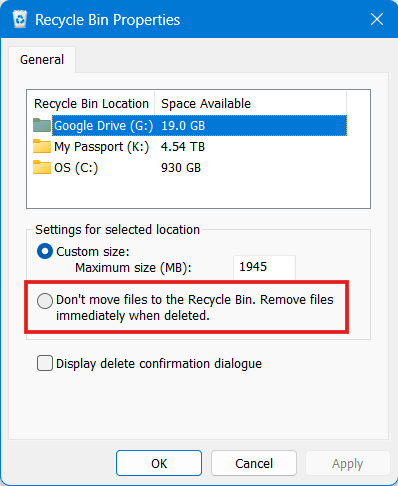
Thanks, Jaime Bernardo (@jaimecbernardo) Sorry, yes, you're right! I must have clicked the "Don't Show" checkbox when I initially started using Windows Photo. Please forgive the lapse in memory - it was a long time ago... 😬 My main concern was that presenting dialogs every time a delete was requested would get in the way, but I'm fine with your suggestion of replicating the Photo app's behaviour with the "Don't Show" checkbox. This will give me a chance to have a play with the Settings code, too, which I've been avoiding. I'm very concerned that the delete operation skipped the Recycle Bin for a file on your external device. Would you mind seeing what your Recycle Bin properties are for that drive, please? It is possible to turn off the Recycle Bin on a per-drive basis:
The Peek code just calls the underlying Shell API, so it should be consistent with doing a delete from Explorer (without holding Shift down); it is a bug if it behaves differently for external drives. |
|
Dave Rayment (@daverayment) using a
https://www.c-sharpcorner.com/blogs/extension-methods-for-delete-files-and-folders-to-recycle-bin Also check out |
Dave Rayment (@daverayment) There's nothing on Recycle Bin for this drive and another I've tested. I'm guessing because their file system is FAT32. |

|
Dave Rayment (@daverayment) , Jaime Bernardo (@jaimecbernardo) |
Hi, Jay (@Jay-o-Way) ! Thanks for the message. It is certainly a shame that System.IO doesn't include recycling options when deleting files. As you noticed, this update to Peek uses the Shell File Operation This isn't enough for our needs, though, so I will add the dialog box to prompt the user when they try to delete a file, as previously discussed. Giving users the option to permanently dismiss this warning replicates what the Windows Photo App does, and is a good compromise for power users. The reason Jaime Bernardo (@jaimecbernardo) experienced the issue with the FAT32 volume is because I needed to include a flag called The VB Core library containing |
Yes, that's what I assumed we'd be doing. I haven't used the Settings system before, but I'll give it a go and I'll ask if I get stuck! |
|
Dave Rayment (@daverayment) /needinfo |
 microsoft-github-policy-service
Bot
added
the
Needs-Author-Feedback
|
Heiko (@htcfreek) Yes, I'm still working on this. Sorry about the delay. |
microsoft-github-policy-service
Bot
added
Needs-Triage
 Heiko (htcfreek)
removed
Needs-Triage
There was a problem hiding this comment.
Copilot reviewed 6 out of 19 changed files in this pull request and generated 1 comment.
Files not reviewed (13)
- .github/actions/spell-check/expect.txt: Language not supported
- src/modules/peek/Peek.FilePreviewer/FilePreview.xaml: Language not supported
- src/modules/peek/Peek.UI/PeekXAML/MainWindow.xaml: Language not supported
- src/modules/peek/Peek.UI/PeekXAML/Views/TitleBar.xaml: Language not supported
- src/modules/peek/Peek.UI/Strings/en-us/Resources.resw: Language not supported
- src/settings-ui/Settings.UI/SettingsXAML/Views/PeekPage.xaml: Language not supported
- src/settings-ui/Settings.UI/Strings/en-us/Resources.resw: Language not supported
- src/modules/peek/Peek.UI/Models/NeighboringItems.cs: Evaluated as low risk
- src/modules/peek/Peek.FilePreviewer/FilePreview.xaml.cs: Evaluated as low risk
- src/modules/peek/Peek.UI/Services/IUserSettings.cs: Evaluated as low risk
- src/settings-ui/Settings.UI.Library/PeekProperties.cs: Evaluated as low risk
- src/modules/peek/Peek.UI/PeekXAML/Views/TitleBar.xaml.cs: Evaluated as low risk
- src/settings-ui/Settings.UI/ViewModels/PeekViewModel.cs: Evaluated as low risk
Comments suppressed due to low confidence (4)
src/modules/peek/Peek.UI/Native/NativeMethods.cs:41
- The initialization of _deletedItemIndexes should use HashSet() instead of [].
private readonly HashSet<int> _deletedItemIndexes = [];
src/modules/peek/Peek.UI/MainWindowViewModel.cs:204
- [nitpick] The hwnd parameter should be renamed to windowHandle for clarity.
public void DeleteItem(bool? skipConfirmationChecked, nint hwnd)
src/modules/peek/Peek.UI/MainWindowViewModel.cs:293
- The ReinstateDeletedFile method does not check if the file still exists before removing it from _deletedItemIndexes, which could lead to inconsistency.
private void ReinstateDeletedFile(IFileSystemItem item, int index)
src/modules/peek/Peek.UI/MainWindowViewModel.cs:271
- The DeleteFile method should have test coverage to ensure it handles different scenarios correctly (e.g., file in use, access denied).
private int DeleteFile(IFileSystemItem item, nint hwnd)


|
Any reason not to include an explicit button for this action? The Windows Photos app has one and the other Peek action that one can perform with files (open in default app) also has one. Another reason to include an explicit button is that the Delete key does not seem to work well with text files because of this issue |
Thanks for your review, Ani (Anirudha Shankar) (@drawbyperpetual) 😊 The intention was to keep the UI minimal, similar to why there are no icons for basic navigation. I also wasn't keen on having a destructive action button in the title bar. However, I do realise that's personal preference. With regard to the WebView-related focus, the current behaviour is a good thing with regard to deletes. There is a difference in user expectation between pressing escape (should exit the viewer) and pressing delete while viewing a text file. When viewing text, Peek gives the user a caret and allows them to select text, so it is reasonable to assume that some of them will try to edit the file contents, including pressing delete to remove a paragraph or whatever. These delete keystrokes shouldn't bubble up to the KeyUp handler. In any case, I'm happy to add the button or wait to see if there is demand for it from the community after the functionality is released. Please let me know. |
Sure; it can always be added later. |

 Ani (Anirudha Shankar) (drawbyperpetual)
left a comment
Ani (Anirudha Shankar) (drawbyperpetual)
left a comment
There was a problem hiding this comment.
Code looks good and works well in my testing!
|
/azp run |

|
Azure Pipelines successfully started running 1 pipeline(s). |
|
/azp run |
|
Azure Pipelines successfully started running 1 pipeline(s). |


PR reviewed by drawbyperpetual user instead


* Add Delete functionality for Peek.

* Updated the "No More Files" text block to use a Uid to load its resource text. Also altered the text style to be consistent with the FailedFallbackPreviewControl error page.

* Revert "Delete Directory.Packages.props"

This reverts commit 3a10918.

* Attempt to appease the spell-checking bot by renaming flag const.

* Show error message InfoBar if file deletion failed.

* Resolve XAML styling.

* XAML styling fix.

* Settings app updates for new delete confirmation setting.

* Add delete confirmation dialog and settings to Peek. Add shell notification event after delete operation.

* Spelling updates.

* Spelling update.

* Remove permanent delete parameter, YAGNI. Add hwnd parameter to delete so warning dialogs are correctly parented. Fix flags to not hide permanent delete warning.

* Simplify delete confirmation dialog. Remove workaround for focus visual issue. Ensure delete confirmation dialog is closed when the main window visibility is toggled.

* Fix delete delay. Do not regard user cancellations of permanent deletes as an error, but log them as info anyway. More descriptive name for delete confirmation dialog checkbox.

* Fix multiple Content_KeyUp events being raised for MainWindow.

* Synchronise ConfirmFileDelete setting between Peek and Settings app.

* Update following review: split System usings from others; do not log deleted item name.

* Fix XAML style

* Add Delete functionality for Peek.

* Updated the "No More Files" text block to use a Uid to load its resource text. Also altered the text style to be consistent with the FailedFallbackPreviewControl error page.

* Revert "Delete Directory.Packages.props"

This reverts commit 3a10918.

* Attempt to appease the spell-checking bot by renaming flag const.

* Show error message InfoBar if file deletion failed.

* Resolve XAML styling.

* XAML styling fix.

* Settings app updates for new delete confirmation setting.

* Add delete confirmation dialog and settings to Peek. Add shell notification event after delete operation.

* Spelling updates.

* Spelling update.

* Remove permanent delete parameter, YAGNI. Add hwnd parameter to delete so warning dialogs are correctly parented. Fix flags to not hide permanent delete warning.

* Simplify delete confirmation dialog. Remove workaround for focus visual issue. Ensure delete confirmation dialog is closed when the main window visibility is toggled.

* Fix delete delay. Do not regard user cancellations of permanent deletes as an error, but log them as info anyway. More descriptive name for delete confirmation dialog checkbox.

* Fix multiple Content_KeyUp events being raised for MainWindow.

* Synchronise ConfirmFileDelete setting between Peek and Settings app.

* Update following review: split System usings from others; do not log deleted item name.

* Fix XAML style


Summary of the Pull Request
This PR adds the ability for users to delete the file currently being previewed in Peek.
PR Checklist
Detailed Description of the Pull Request / Additional comments
There are several new and changed elements in this PR:
Itemscollection (which could be very large). There are nowDisplayIndexandDisplayItemCountproperties, which reflect the calculated position and total. The oldCurrentIndexstill points to the actual index of the current item in the collection, but this is now internal only.Shift + Deletecould do a permanent delete, and this is certainly possible in the future, but this release errs on the side of caution, especially as it's a new feature and involves deleting things.NativeMethods.csfor the API call, struct, flags, and error messages.Screenshots
No More Files message
File Count For Single Remaining File
Validation Steps Performed
(Manual tests only.)
Tested: